

Project Directory Structure
The initial configuration of your local directory can be done using the init command. This command initializes the directory and pulls configurations from the project.
The Storage API token for your project is stored in the .env.local file under the KBC_STORAGE_API_TOKEN directive.
Currently, you must use a master token.
To maintain security, .env.local is automatically included in the .gitignore file to prevent it from being committed to your Git repository.
Manifest - Naming defines directory names. Typically, this setting does not need to be changed. Each object (branch, configuration, row) is guaranteed to have a unique directory, even if objects share the same name.
Below is an example of a default project directory structure. Some files and directories are specific to the component type. For example, transformations are represented by native files. A more detailed description can be found in the chapters below.
🟫 .gitignore - excludes ".env.local" from the Git repository🟫 .env.local - contains the Storage API token🟫 .env.dist - template for ".env.local"📂 .keboola - project metadata directory┣ 🟦 manifest.json - contains object IDs, paths, naming and other configuration details┣ 🟦 project.json - project cache for local commands, including backends and features┗ 🟫 .kbcignore - optional file listing paths to configurations to exclude from CLI sync🟩 description.md - project description📂 [branch-name] - branch directory (e.g., "main")┣ 🟦 meta.json┣ 🟩 description.md┣ 📂 _shared - shared code directory┃ ┗ 📂 [target-component] - target component (e.g., "keboola.python-transfomation")┃ ┗ 📂 codes┃ ┗ 📂[code-name] - shared code directory┃ ┣ 🟫 code.[ext] - native file (e.g., ".sql" or ".py")┃ ┣ 🟦 config.json┃ ┣ 🟦 meta.json┃ ┗ 🟩 description.md┗ 📂 [component-type] - e.g., extractor, app, ... ┗ 📂 [component-id] - e.g., keboola.ex-db-oracle ┗ 📂 [config-name] - configuration directory (e.g., "raw-data") ┣ 🟦 config.json ┣ 🟦 meta.json ┣ 🟩 description.md ┣ 📂 rows - only if the configuration has some rows ┃ ┗ 📂 [row-name] - configuration row directory (e.g., "prod-fact-table") ┃ ┣ 🟦 config.json ┃ ┣ 🟦 meta.json ┃ ┗ 🟩 description.md ┣ 📂 blocks - only if the configuration is a transformation ┃ ┗ 📂 001-block-1 - block directory ┃ ┣ 🟦 meta.json ┃ ┗ 📂 001-code-1 - code directory ┃ ┣ 🟫 code.[ext] - native file (e.g., ".sql" or ".py") ┃ ┗ 🟦 meta.json ┣ 📂 phases - only if the configuration is an orchestration ┃ ┗ 📂 001-phase - phase directory ┃ ┣ 🟦 phase.json ┃ ┗ 📂 001-task - task directory ┃ ┗ 🟦 task.json ┣ 📂 schedules - only if the configuration has some schedules ┃ ┗ 📂 [schedule-name] - schedule directory ┃ ┣ 🟦 config.json ┃ ┣ 🟦 meta.json ┃ ┗ 🟩 description.md ┗ 📂 variables - only if the configuration has some variables defined ┣ 🟦 config.json - variable definition, name, and type ┣ 🟦 meta.json ┣ 🟩 description.md ┗ 📂 values - multiple sets of values can be defined ┗ 📂 default - default values directory ┣ 🟦 config.json - default values ┣ 🟦 meta.json ┗ 🟩 description.mdBranches
Section titled “Branches”The tool works with development branches by default. You can specify which branches from the project
you want to work with locally during the init command. Alternatively, you can ignore the development branches concept and work exclusively
with the main branch. However, note that all configurations will then be stored in the main directory.
The main branch directory is simply named main and does not include the branch ID. This makes it easily distinguishable from the other branches.
Each branch directory contains:
description.md: Use this file to write a branch description formatted in Markdown.meta.json: Contains the name of the branch and a flag indicating whether it is the default branch.
Example of meta.json:
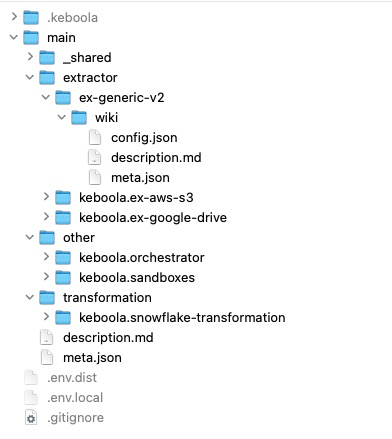
{ "name": "Main", "isDefault": true}Within the branch directory, configurations are organized into thematic directories: extractor, other, transformation, and writer.
Example of a branch folder with components configurations:
Configurations
Section titled “Configurations”Each configuration directory contains the following files:
config.json: Includes parameters specific to the component.description.md: A description file formatted in Markdown.meta.json: Contains the name of the configuration.
Example of config.json for the Generic extractor:
{ "parameters": { "api": { "baseUrl": "https://wikipedia.org" } }}Example of meta.json:
{ "name": "Wikipedia"}Configuration directories can be copied freely within the project and between projects. Their IDs are stored in the manifest. After copying, run the persist command to generate a new ID for the configuration and update it in the manifest.
Configuration Rows
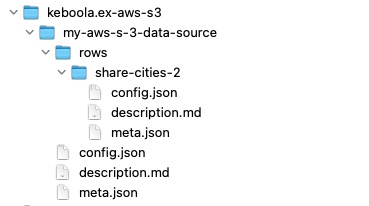
Section titled “Configuration Rows”The directory structure for configuration rows is identical to that of configurations. The component configuration
includes a rows directory, which contains a subdirectory for each row. Each row directory includes config.json,
description.md, and meta.json.
Example of meta.json:
{ "name": "share/cities2", "isDisabled": false}Example of a Google Drive extractor configuration:
Transformations
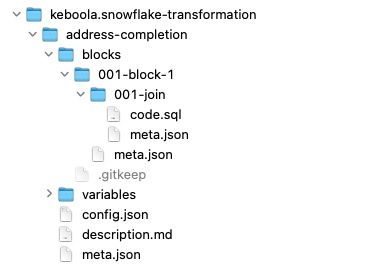
Section titled “Transformations”In addition to standard configurations, transformation directories include a blocks directory containing a list of codes.
Codes are stored as native files corresponding to the transformation type. For example, Snowflake transformations store codes
in .sql files.
Example of a Snowflake transformation configuration:
Variables
Section titled “Variables”The variables directory, in addition to the standard
configuration layout, contains a values subdirectory.
For example, suppose you have the following two variables in your transformation:
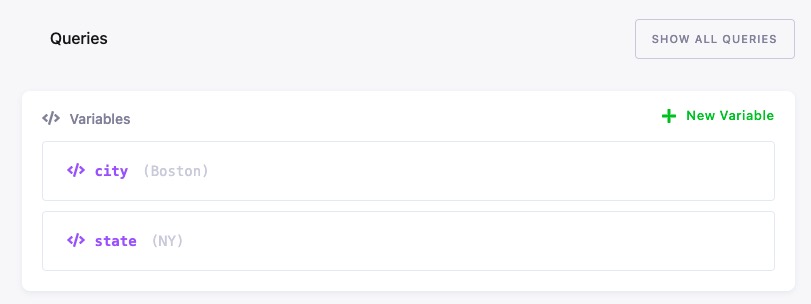
When you pull them to the local directory, the structure will look like this:
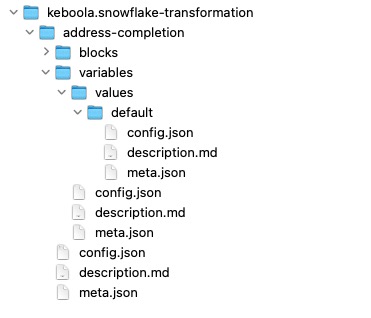
Variables configuration in variables/config.json:
{ "variables": [ { "name": "state", "type": "string" }, { "name": "city", "type": "string" } ]}Default values configuration in variables/values/default/config.json:
{ "values": [ { "name": "state", "value": "NY" }, { "name": "city", "value": "Boston" } ]}Configuration Variables Overview
Section titled “Configuration Variables Overview”One-to-One Relationship Variable Types
Section titled “One-to-One Relationship Variable Types”-
variablesFor: This relation links a set of variables to a specific configuration or object that requires them to function properly. It ensures the dependency between variables and their target is clearly defined. -
variablesFrom: This type indicates that variables are derived or used from another configuration, allowing shared or inherited data between objects. It helps track the source of the variables. -
variablesValuesFor: This relation connects specific variable values to a configuration, often used in scenarios like environment-specific settings. It enables precise association and management of variable values. -
variablesValuesFrom: It represents a connection where values are inherited from another configuration, supporting reusability and consistent data sharing across objects. This avoids redundancy in value definitions.
Many-to-One Relationship Variable Types
Section titled “Many-to-One Relationship Variable Types”-
sharedCodeVariablesFor: Links shared code with associated variables, allowing multiple configurations to refer to common logic. It promotes reuse and reduces duplication. -
sharedCodeVariablesFrom: This defines that variables are sourced from shared code, ensuring consistent integration with centralized reusable logic. It maintains modularity and cohesion. -
schedulerFor: Connects a configuration to a scheduler, indicating tasks that need to be timed or executed automatically. Commonly used in orchestration or automation setups. -
usedInOrchestrator: Marks an object as used within an orchestrator, linking configurations or components required in workflows or pipelines. It ensures proper integration of orchestrated processes. -
usedInConfigInputMapping: Denotes that a configuration is used for input data mapping, linking data sources to transformations. It is essential for aligning inputs with the appropriate configurations. -
usedInRowInputMapping: Similar tousedInConfigInputMapping, but applies to input mapping at the row level within a configuration. It allows fine-grained control of input relationships.
Shared Code
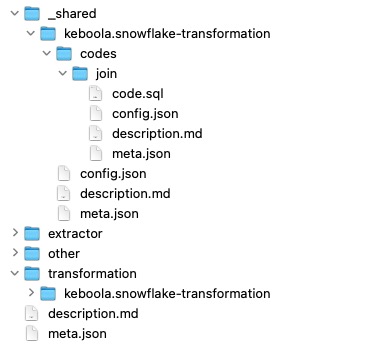
Section titled “Shared Code”Shared code blocks are stored in the branch directory
under the _shared subdirectory, enabling reuse across different configurations.
If you create shared code from a block:

It will move to the _shared directory:
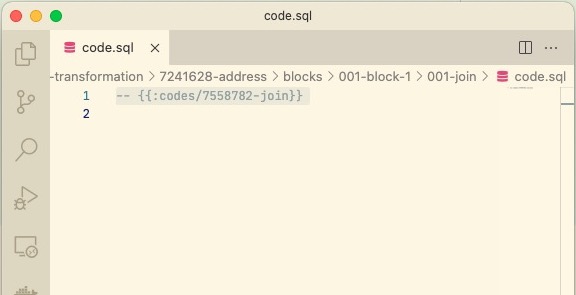
The code in the transformation file blocks/block-1/join/code.sql will then be replaced with:
Schedules
Section titled “Schedules”The Orchestrator or any other component can have a schedule to run automatically and periodically. The schedule configuration is stored within a specific directory.
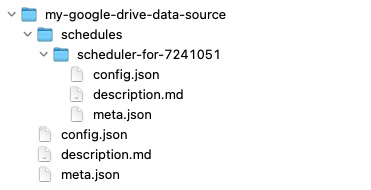
The config.json file for the schedule contains the schedule in crontab format, the timezone, and a flag
indiciating whether the schedule is enabled.
For example, the following configuration runs at the 40th minute of every hour:
{ "schedule": { "cronTab": "40 */1 * * *", "timezone": "UTC", "state": "enabled" }, "target": { "mode": "run" }}Orchestrations
Section titled “Orchestrations”Orchestrator directories include the phases directory, which contains a list of tasks for execution.
Example:
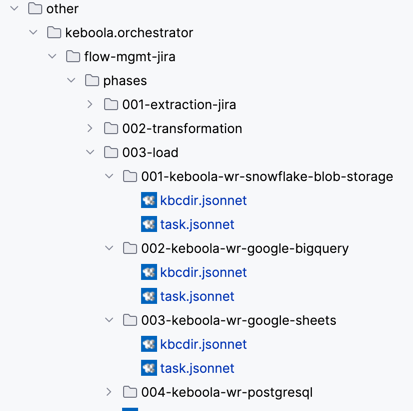
Example phase.json:
{ "name": "Transformation", "dependsOn": [ "001-extraction" ]}Example task.json:
{ "name": "keboola.snowflake-transformation-7241628", "task": { "mode": "run", "configPath": "transformation/keboola.snowflake-transformation/address-completion" }, "continueOnFailure": false, "enabled": true}Using kbcdir.jsonnet for different orchestration phases:
The kbcdir.jsonnet file can be used to specify which directories in the phases folder should be ignored for different project backends. By setting the isIgnored value to true in the file, you can exclude specific directories.
Example kbcdir.jsonnet:
{ "isIgnored":false}Manifest
Section titled “Manifest”The local state of the project is stored in the .keboola/manifest.json file. It is not recommended to modify
this file manually.
Basic Manifest Structure
Section titled “Basic Manifest Structure”version: Current major version (e.g.,2)project: Information about the projectid: ID of the projectapiHost: URL of the Keboola instance (e.g.,connection.keboola.com)
allowTargetEnv: Boolean (default:false)- If
true, allows environment variablesKBC_PROJECT_IDandKBC_BRANCH_IDto temporary override the target project and branch without modifying the manifest. - The mapping is bidirectional and occurs during the manifest’s save and load operations.
- For more information, see the —allow-target-env option in the kbc sync init command.
- If
sortBy: Property name used for sorting configurations (default:id)naming: Rules for directory naming (see details)allowedBranches: Array of branches to work withignoredComponents: Array of components to excludetemplates:repositories(array):- Local repository:
type=dirname: Repository nameurl: Absolute or relative path to a local directory- Relative path must be relative to the project directory.
- Git-based repository:
type=gitname: Repository nameurl: URL of the Git repository- E.g.,
https://github.com/keboola/keboola-as-code-templates.git
- E.g.,
ref: Gitbranchortag(e.g.,mainorv1.2.3)
- Local repository:
branches: List of used branchesid: Branch IDpath: Directory name (e.g.,main)
configurations: List of component configurationsbranchId: Branch IDcomponentId: Component ID (e.g.,keboola.ex-aws-s3)id: Configuration IDpath: Path to the configuration in the local directory (e.g.,extractor/keboola.ex-aws-s3/7241111/my-aws-s3-data-source)rows: List of configuration rows (if the component supports rows)id: Row IDpath: Path to the row from the configuration directory (e.g.,rows/cities)
Naming
Section titled “Naming”Directory names for configurations follow the rules in the manifest under the naming section.
These are the default values:
{ "branch": "{branch_name}", "config": "{component_type}/{component_id}/{config_name}", "configRow": "rows/{config_row_name}", "schedulerConfig": "schedules/{config_name}", "sharedCodeConfig": "_shared/{target_component_id}", "sharedCodeConfigRow": "codes/{config_row_name}", "variablesConfig": "variables", "variablesValuesRow": "values/{config_row_name}" }To include object IDs in directory names, use these values:
{ "branch": "{branch_id}-{branch_name}", "config": "{component_type}/{component_id}/{config_id}-{config_name}", "configRow": "rows/{config_row_id}-{config_row_name}", "schedulerConfig": "schedules/{config_name}", "sharedCodeConfig": "_shared/{target_component_id}", "sharedCodeConfigRow": "codes/{config_row_name}", "variablesConfig": "variables", "variablesValuesRow": "values/{config_row_name}" }Use the fix-paths command to rebuild the directory structure with updated naming rules.
Project Cache
Section titled “Project Cache”The project cache is stored in .keboola/project.json and is used by local commands without making authorized requests to the Storage API.
This is its basic structure:
backends: List of project backendsfeatures: List of project featuresdefaultBranchId: ID of the default branch
Example:
{ "backends": [ "snowflake" ], "features": [ "workspace-snowflake-dynamic-backend-size", "input-mapping-read-only-storage", "oauth-v3" ], "defaultBranchId": 123}.kbcignore
Section titled “.kbcignore”You can exclude specific configurations, configuration rows, or individual fields from the sync process by creating a .kbcignore file in the .keboola directory.
It is a plain text file where each line specifies either:
- A path to a configuration or configuration row to exclude entirely, in the format
{component_id}/{configuration_id}/{row_id}(therow_idis optional for row-based configurations). - A field-level ignore rule in the format
{component_id}/{configuration_id}:{field_name}, which excludes a single field from synchronization while keeping the rest of the configuration managed by the CLI.
Comments (lines starting with #) and empty lines are ignored.
Configuration and Row Ignore
Section titled “Configuration and Row Ignore”Example .kbcignore file:
keboola.python-transformation-v2/1197618481keboola.keboola.wr-db-snowflake/1196309603/1196309605This excludes:
- The configuration of the Python transformation (
keboola.python-transformation-v2) with the ID1197618481. - Row ID
1196309605in the configuration of the Snowflake writer (keboola.keboola.wr-db-snowflake) with the ID1196309603.
As a result, the kbc sync pull and kbc sync push commands will not synchronize these configurations.
Field-Level Ignore
Section titled “Field-Level Ignore”In addition to ignoring entire configurations or rows, you can ignore individual fields within a configuration. This is useful when you want to manage most of a configuration via the CLI but let a specific field be controlled exclusively in the Keboola UI (or vice versa).
The syntax is:
{component_id}/{configuration_id}:{field_name}Where field_name is either:
- A struct-level field of the configuration — currently
isDisabledis supported. - A dot-notation content key referring to a path inside the configuration’s
config.jsoncontent, e.g.,schedule.cronTab.
Example .kbcignore with field-level rules:
# Ignore the isDisabled flag — let the UI control whether this config is enabledex-generic-v2/798412456:isDisabled
# Ignore the cron schedule — let the UI control the schedule timingkeboola.scheduler/801234567:schedule.cronTab
Field-level ignore is bidirectional:
kbc sync push: The remote value of the ignored field is kept. Any local change to that field is discarded before the diff is computed, so the field is never pushed.kbc sync pull: The local value of the ignored field is kept. Any remote change to that field is discarded before the diff is computed, so the field is never pulled.
In both cases the rest of the configuration is synchronized normally.
Configuration-Level Ignore
Section titled “Configuration-Level Ignore”kbc push operation
The kbc push command will skip the excluded configurations and will not push them back to the project, even if they exist or have been modified in the local folder structure.
The log will display the following message:
➜ kbc pushPlan for "push" operation: × main/transformation/keboola.python-transformation-v2/dev-l0-sample-data - IGNOREDSkipped remote objects deletion, use "--force" to delete them.Push done.The log clearly identifies configurations that were ignored, even if they are absent in the local folder structure.
kbc pull operation
The kbc pull command will exclude the matched configurations and not pull them from the project.
If the configuration was already present locally, the log will indicate its deletion as shown below:
➜ kbc pullPlan for "pull" operation: × C main/writer/keboola.wr-db-snowflake/my-snowflake-data-destination × R main/writer/keboola.wr-db-snowflake/my-snowflake-data-destination/rows/test-sheet1Pull done.